I started as an apprentice ironworker in 1982, and I've been doing takeoffs digitally since 2001. If you ask me where an erector loses money on a bid, I won't say the beams or the columns. Those are easy to count, and every estimator gets them close. We lose money in the details.
The field weld called out on one foundation detail. The bottom flange brace hidden behind a keynote. The kicker detail that shows up on six sheets when you only caught it on two. Those are the pieces that don't make it into the number, and they're the ones the field has to install anyway. That gap comes out of your margin.
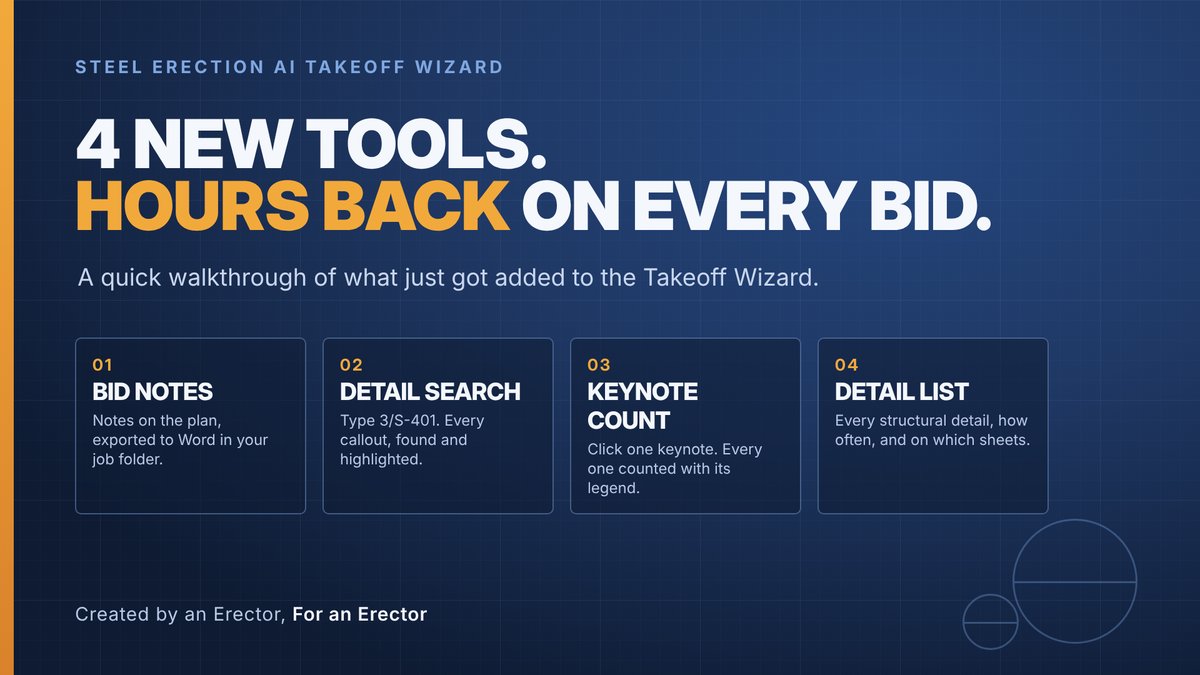
So that's what we went after. We just added four tools to the Steel Erection AI Takeoff Wizard, and every one of them is built around the same problem: finding, counting and keeping track of the stuff that hides in a plan set.
Watch the walkthrough:
Bid Notes 0:33 | Detail Search 2:09 | Detail List 5:24 | Keynote Count 8:00
1. Bid Notes: Every note in one place, tied to the plan
Here's how notes usually go on a bid. Some are scribbled on a notepad. Some are in a Word doc in the job folder. Some are in an email to yourself. Some are in your head. Then your boss asks why you priced the stair tower the way you did, and you're digging through three places trying to remember which sheet you were looking at.
Bid Notes puts all of it inside the plan set. You drop a note right on the spot of the drawing you're talking about, and it stays there. There's also a notepad for the bid as a whole: access, crane setup, schedule concerns, questions for the GC. When you're done, one click exports everything into a Word doc in your job folder.
The real payoff is the review. When you sit down with your boss or your PM, every note is linked to the plan. Click the note and you're on that sheet, looking at what you were looking at when you wrote it. No more "I think it was on one of the framing plans."
2. Detail Search: Stop hunting for callouts
This one is a huge deal. Say there's a detail on a foundation sheet with a field weld you need to account for. Now you have to find every place that detail is called out across a 150-sheet set. That means flipping sheet by sheet, squinting at every bubble, and hoping you didn't miss one.
With Detail Search, you type the detail, like 3/S-401. It finds every sheet that calls it out, highlights each callout, and takes you straight to the detail itself. You're not searching anymore. The system already did it, and it shows you exactly where.
It reads the actual text in the drawing, so it's fast, and it flags any sheet it couldn't read so nothing slips by quietly. If a search can miss a callout without telling you, you can't trust it. This one tells you.
3. Keynote Count: Find the little numbers hiding in all those lines
Every estimator knows this one. You're looking at a framing plan with a thousand lines on it, and somewhere in there are the little circled keynotes: 1, 2, 3, 4, 5. Each one means work. Bottom flange bracing, infill framing, a divider curtain support. Your eyes go blind after a while, and they're scattered all over the sheet.
Keynote Count fixes that. Click one keynote on the plan and it counts every keynote on the sheet, pulls the description from the Key Notes legend, and highlights each one so you can see where they are. It knows the difference between a keynote and a grid bubble, so you're not chasing false counts.
When we tested it against my own hand count on a school project, it found three keynotes I had missed. That's three pieces of work that would have been left out of the bid.
4. Detail List: The one that changes how you work a bid
This is the tool I'm most excited about. The Detail List reads the whole plan set and gives you every structural detail in it, from the foundations through the miscellaneous steel. For each detail it tells you how many times it's called out and on which sheets. Click any sheet and you're there, with the callouts highlighted.
Here's what that does to a bid. You can go right down the list and build an assembly for each detail. Put it in your project favorites. Go to each location where it's called out, drag and drop that detail, highlight it, and that one's done. Then go to the next detail. You can blow right through the details in a plan set instead of hunting for them one sheet at a time.
It also shows you what's not called out. Typical details that never get referenced end up grouped at the bottom, so you can decide how to handle them instead of finding out on the job.
Remember, the counts are callouts on the drawings, not field quantities. A typical detail called out once can cover a lot of locations, so you still verify. But now you know where every detail is, and that's the part that was costing us.
Why this matters
Erectors don't lose bids on the big iron. We lose money on the stuff that's easy to miss: the details, the keynotes, the notes that never made it into the number. Every one of these tools is aimed straight at that.
You still do the estimating. The software doesn't bid the job for you. It finds what's hiding in the plan set, puts it in front of you, and keeps track of it, so you're making decisions instead of hunting.
That's what we mean by Created by an Erector, For an Erector.
See it for yourself
Watch the full walkthrough above. The chapters let you jump to the tool you want.
Try them on your next bid: steelerectionbidwizard.com
Bring your questions to our live Q&A every Thursday at 11:00 AM Eastern: meet.goto.com/sebw
Or call me directly at 505-249-2390.
Created by an Erector, For an Erector.